Most lead quizzes work best with five to seven questions. Seven is a safe place to start, because it gives each result enough answers to rest on, takes about two minutes and still feels short. The real answer depends on how many results you have and what you will do with each lead, so this guide shows how to count the questions you need, test each one and cut the rest.

The short answer: start with seven, keep what earns its place
Every template in Squarespell Quiz comes with seven questions, a lead form and three scored outcomes. The template pages, read on October 22, 2026, describe each one as “about 2 minutes to take”. That is a sensible default for a lead quiz on a service or product site.
From there, the number should move for a reason, not by feel:
- Three or four questions when the quiz makes one simple choice, such as which of three packages fits.
- Five to seven questions for most lead quizzes with three or four results and a follow-up email.
- Ten or more only for an assessment, where the detailed score is the thing people came for.
The rest of this guide explains where those numbers come from, so you can decide for your own quiz instead of copying ours.
Why the number depends on your results
In a scored quiz each answer carries points, and the total decides which result a person sees. So the number of questions controls how finely the quiz can tell people apart.
Take the Coaching Readiness template. Each of its seven answers is worth 1 to 4 points, so a total runs from 7 to 28. The template page splits that into three bands: 7 to 13 shows The Foundation Course, 14 to 20 shows The Growth Blueprint and 21 to 28 shows The Accelerator. Each band covers seven or eight possible totals, and no single answer can move someone across a whole band on its own.
Now cut the same quiz to three questions. The total runs from 3 to 12, only ten possible totals for three results. One answer can change the total by three points, which is enough to jump from one result to the next. The result feels less earned, and a visitor who answers one question on a whim can land in the wrong place.
Two rules follow from that:
- More results need more questions. Three results sit comfortably on five to seven questions. Five or six results usually need a few more, or the bands get too narrow to trust.
- More questions make each answer matter less. That is good up to a point, because the result reflects the whole picture. Past that point, people stop reading the questions and start clicking through.
If scoring is new to you, our guide on lead scoring with a quiz covers how points turn into a priority for your follow-up.
The test every question has to pass
A question earns its place if it does at least one of two jobs:
- It changes the result. Different people would pick different answers, and those answers push them toward different outcomes.
- It changes your follow-up. You will use the answer in the email, the call or the offer, even if it does not move the score much.
The Coaching Readiness questions show both jobs. “What does your monthly revenue look like?” changes the result and tells the coach which program to talk about on the call. “How soon do you want to start?” changes the score and tells the coach who to call first. A question such as “What is your favorite color?” does neither, however fun it is.
Your quiz results show you when a question fails the first job. If almost everyone picks the same answer, the question is not separating anyone.
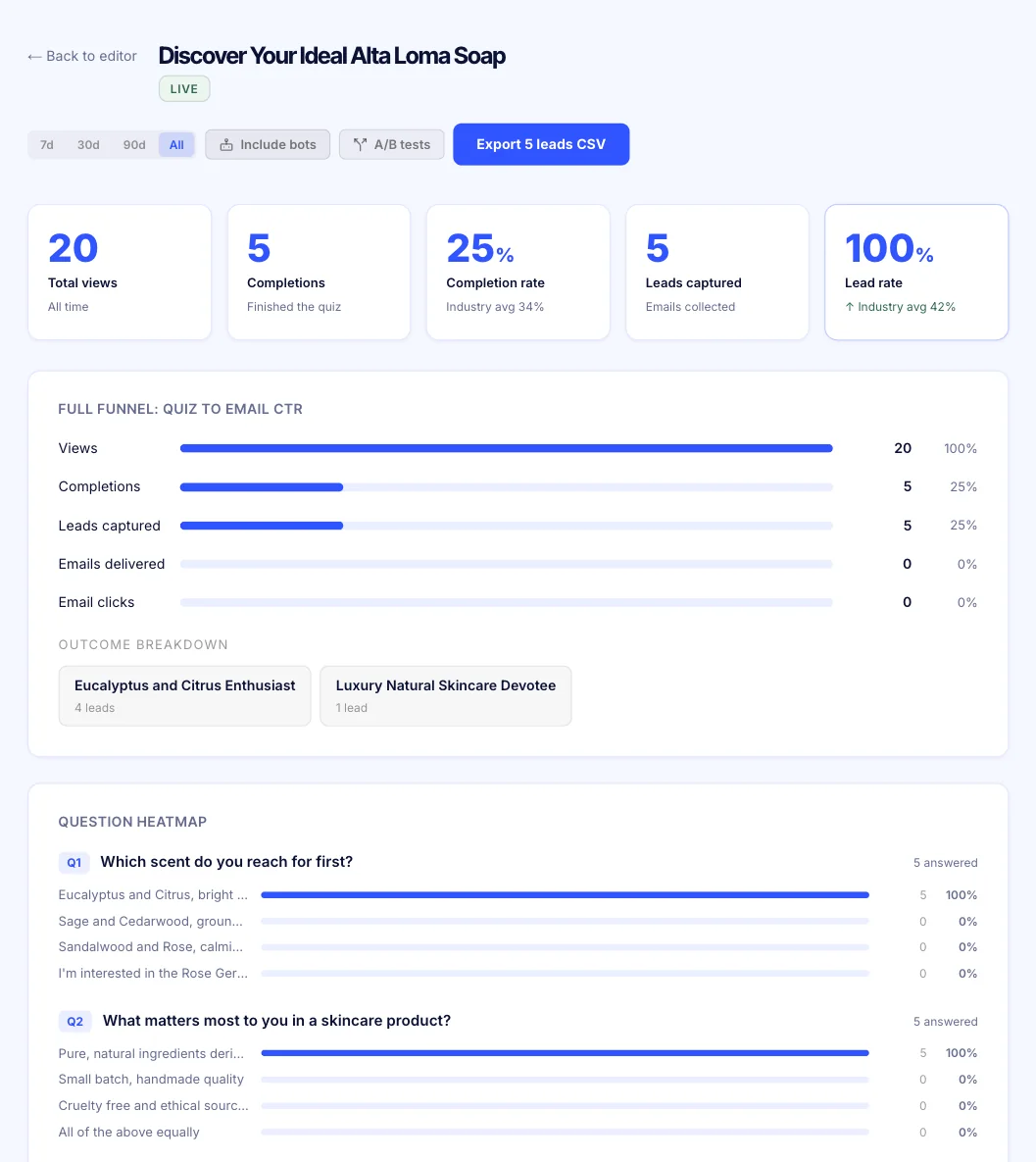
Five demo answers prove nothing on their own, but the heatmap is where you would see it with real traffic. When one answer takes nearly all the votes, rewrite the options so they describe real differences, or cut the question.
Keep a follow-up question out of the score. A question that only shapes your follow-up, such as which class times suit someone, should not decide their result. Give every answer to it the same points, so it does not move the total. The template pages invite this: “Change the points to match how you sell, so the result reflects what matters most to you.”
Count the lead form as part of the quiz
Visitors do not separate questions from form fields. If your quiz has seven questions and the lead form asks for email, first name, phone and company, the visitor feels eleven steps.

The templates keep the form short. The Menu Recommendation template asks for an email address and an optional first name; the Coaching Readiness template adds an optional phone number. The features page lists email, name, phone, company and custom fields, but every field you add is one more thing to fill in at the moment people most want their result.
A good trade: if you need a phone number, drop a question. If a question only exists to learn something you could ask on the first call, move it to the call.
When three or four questions are enough
A short quiz is the right size when the decision is simple. A business with three packages and clear differences between them can often sort visitors with four questions about goal, size, budget and timing. Our guide to a which package is right for you quiz builds exactly that.
A short quiz also fits when the quiz sits on a page where people are already close to a decision, such as a pricing page. They want a nudge, not an interview.
The cost of a short quiz is the arithmetic above: each answer carries more weight. Make every option clearly different, and check a few test runs to see that each result can be reached.
When ten or more questions are fine
Longer quizzes work when the length is part of the value. A readiness assessment, a skills audit or a detailed score where people want to see how they did on each area can justify ten questions or more, because the visitor expects to work for a careful answer.
Two things help a long quiz:
- Say how long it is before question one. A line such as “10 questions, about 3 minutes” sets the expectation. Our guide to the quiz landing page covers what else to show before the first question.
- Show progress. The progress bar is a switch in the quiz settings, under Behavior, and the live quiz shows the question number and a percentage.
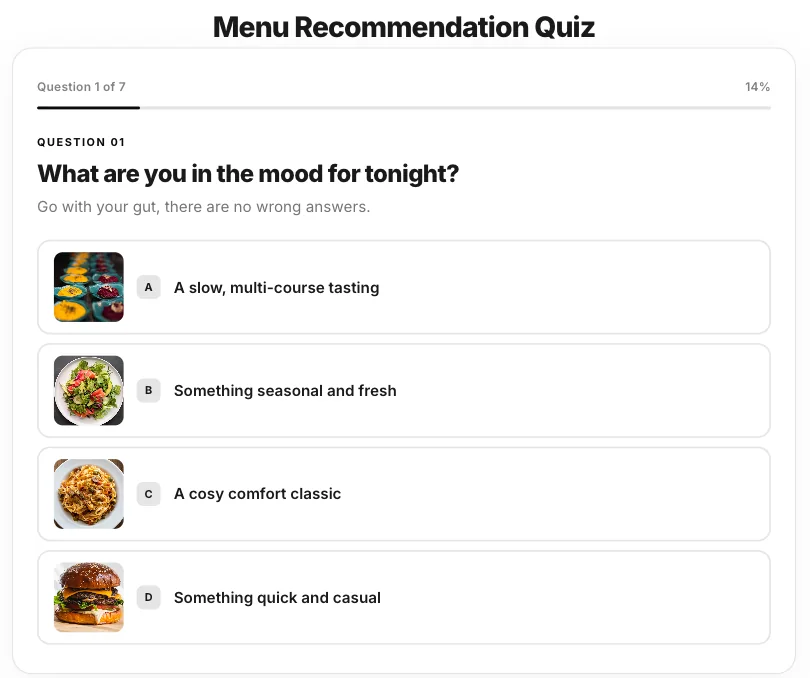
If your list of questions is growing past ten for a plain lead quiz, it is usually a sign that the quiz is doing two jobs. Split it, or move the extra questions to the follow-up.
A worked example: cutting ten questions to six
Here is a made-up yoga studio with three offers: a beginner course, regular classes and private sessions. Its first draft had ten questions. Each one went through the test above.
| Question | Changes the result? | Changes the follow-up? | Verdict |
|---|---|---|---|
| What brings you to yoga? | Yes | Yes | Keep |
| Have you practiced before? | Yes | Yes | Keep |
| How often can you come? | Yes | Yes | Keep |
| Group or one to one? | Yes | Yes | Keep |
| Any injuries we should know about? | No | Yes, but better asked by the teacher | Move to the first class |
| What time of day suits you? | No | Yes, which class times to send | Keep, same points on every answer |
| How did you hear about us? | No | No | Cut |
| Favorite kind of music? | No | No | Cut |
| How soon do you want to start? | Yes, it shows intent | Yes, who to contact first | Keep |
| Do you have your own mat? | No | No, everyone gets the same answer | Cut |
Six questions stay: five that score and one that only shapes the welcome email. The injury question did not disappear; it moved to a place where a person can ask it properly. The studio now has a quiz that takes about as long as the templates and still tells it everything it uses.
Notice what was cut: three questions whose answers would not change anything the studio says or does. Questions like these are easy to write and easy to miss, so run the test on every draft.
How to see where people quit
Once the quiz is live, the numbers tell you whether the length is right. Squarespell Quiz shows how many people viewed, started and completed each quiz, and the dashboard has a Question drop-off panel with the share of people who stopped at each question.

Read it this way:
- A spike at one question points to that question, not the length. It may be confusing, too personal or slow to answer. Rewrite it before you cut anything else.
- A steady loss toward the end points to length. Try removing the weakest question by the test above and compare the next few weeks.
- A loss at the lead form points to the form or the promise. Ask for fewer fields, or say more clearly what the result will give them.
On October 22, 2026 the pricing page listed question drop-off analysis as a Pro feature, and every new account starts with 14 days of Pro features with no credit card. Change one thing at a time, so you know what made the difference.
Your next step
Write down your results first, then list the questions that would separate them, then add the one or two you need for the follow-up. If that list lands between five and seven, you are in good shape. If you would rather edit than start from a blank page, open the quiz templates: each has seven questions with the points already set, so you can apply the test above and cut from there. You can start a free trial to build it, and our guide on how to create a quiz lead magnet covers the rest of the build.
How this guide was checked. The template counts, points, score bands and lead form fields come from the Squarespell Quiz templates, Coaching Readiness and Menu Recommendation pages, read on October 22, 2026, and the features, pricing and changelog pages were read the same day. The screens come from our reviewed library, captured October 3 and 4, 2026; the changelog shows no change to these parts of the app since then, and the analytics screens show test data. The point totals are simple arithmetic. The yoga studio is a made-up example, and no completion or drop-off rates are claimed for any quiz length. Nothing was built or changed in the app for this article, and setting the same points on every answer of a question was not tested in the editor.