If you want one quiz on one Squarespace site and you are happy to read your leads in your email tool, a quiz plugin you pay for once usually costs less. If you want templates, a place to see every lead with their answers, a result email for each person and numbers on where people quit, a monthly quiz app gives you more for the money. Squarespell sells both, so this guide sets them side by side and says plainly who should buy the cheaper one.

Two ways to pay for a quiz
Quiz tools for Squarespace come in two shapes, and the way you pay follows from the shape.
- A plugin. You buy a code snippet, add it to your Squarespace site and set up the quiz. You pay once. What you get is what the snippet does.
- A hosted app. The quiz runs on the app’s servers and shows on your site. You pay monthly or yearly, and the app keeps your leads, sends emails and counts results for you.
Neither is better in general. The right one depends on how many quizzes you plan to run, what you do with a lead once you have it, and whether a monthly bill is a problem for you. The two products below are the ones Squarespell makes: the Interactive Quiz Plugin for Squarespace 7.1, sold on squarespell.com, and Squarespell Quiz, the app this site is about.
What the one-time plugin gives you
Everything in this section comes from the plugin’s listing as we read it on October 5, 2026. The listing describes three main features: lead capture, flexible outcomes and a mobile-ready layout.

In more detail, the listing says the plugin:
- Collects an email before the quiz. Visitors give their name and email first, then answer.
- Shows multiple results with custom messages. You write the outcomes, and the listing says results are also delivered by email.
- Is set up in a visual builder. You change the questions, answers, colors and branding without code.
- Works on phones, tablets and desktop, with a progress bar.
- Connects to email tools. Its FAQ names Mailchimp, ConvertKit, Klaviyo and ActiveCampaign, and a Zapier webhook for other tools.
How the plugin is installed
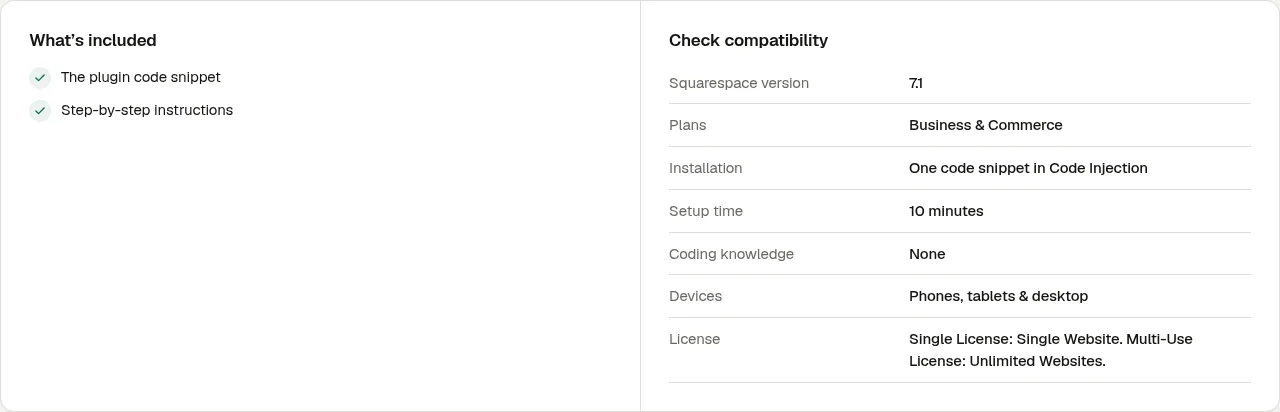
The listing gives three steps: buy the plugin and paste the code snippet into Squarespace’s Code Injection, build the quiz in the visual builder, then watch leads arrive in your email platform. It also offers to do the install for you at no extra cost.

What the plugin costs
On October 5, 2026 the listing offered a Single License at $45 for one website and a Multi-Use License at $145 for unlimited websites. Both are one-time purchases with no monthly fee, and the listing says updates and support are included. Check the listing for today’s price before you buy.
Check your Squarespace plan first
The listing says the plugin is built for Squarespace 7.1 and names the Business and Commerce plans. Those are older Squarespace plan names, so what really matters is whether your plan includes Code Injection. Squarespace’s code injection guide lists the plans that include it.
What a quiz subscription adds
A hosted app costs more over time because it does more after the quiz ends. Here is what Squarespell Quiz adds, from the app’s own screens and from the features and pricing pages read on October 5, 2026.
Templates and a first draft from your site
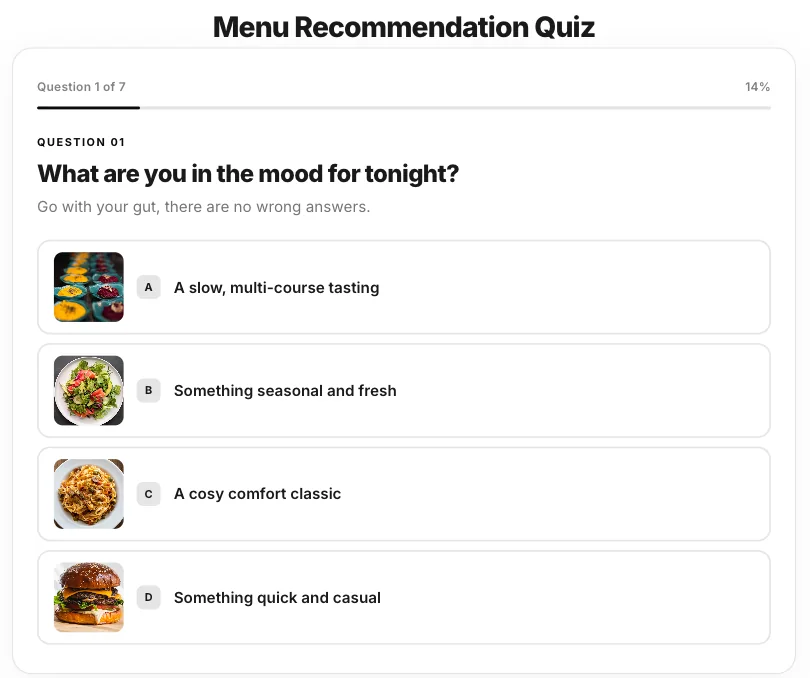
You can start from one of 16 templates, each with seven questions, a lead form and three outcomes already written, or paste your Squarespace site address and let the app draft a quiz around what you sell. You edit every word before anything goes live.

Scoring you set per answer
Every answer carries points, and each outcome covers a range of the total score. The visitor sees one question at a time and then the result that fits their total, with its own text and button.

Every lead in one place, with their answers
Leads are saved in the app with the quiz they took and their score, and you can filter them and export a CSV. With a plugin, the lead goes to your email tool and the context around it depends on what that tool keeps.

Follow-up email and numbers
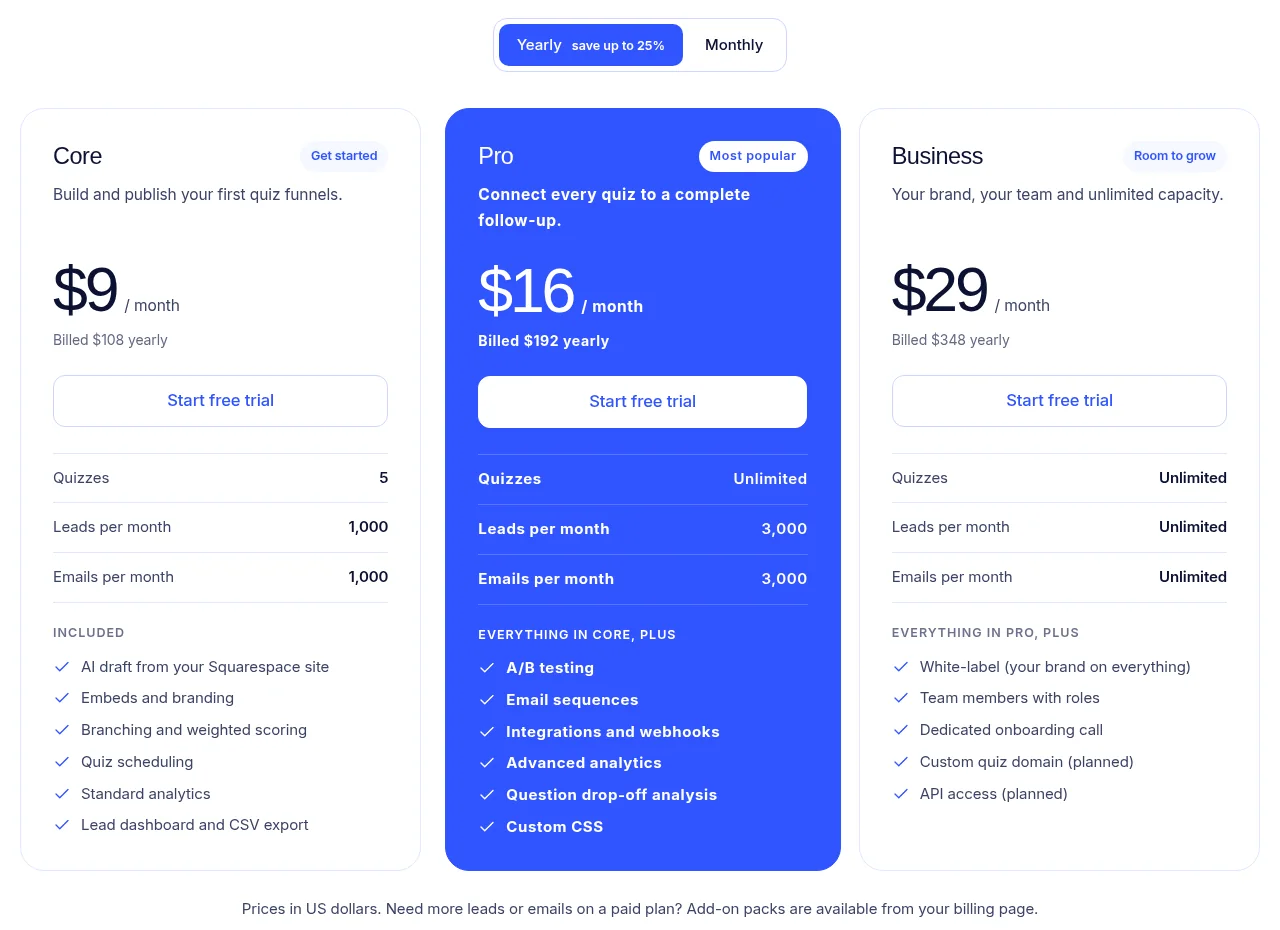
The pricing page lists a result email to every lead on all plans. On Pro and Business, each outcome can also start its own email sequence, and integrations with Mailchimp, Klaviyo, Kit and Google Sheets are included, along with webhooks, drop-off by question and A/B testing.

Analytics show views, completions, leads and the completion rate for every quiz you publish.

Publishing from the app
You connect your website once by pasting one loader line from the app into Squarespace’s Code Injection. After that you publish each quiz from the app as a floating tab, a popup or inline on a page, and choose the pages it shows on. Like the plugin, this needs a Squarespace plan with Code Injection.

See it in a short video
This full tour from the Squarespell Quiz YouTube channel walks through the app: the two ways to create a quiz (a template or the AI draft from your site), the editor, leads, email and analytics. Its publishing part shows the embed code from the app’s Manual embed screen; the simpler route today is Publish to website, described above.
One-time plugin and subscription side by side
| One-time plugin | Squarespell Quiz (subscription) | |
|---|---|---|
| How you pay | Once, per license ($45 or $145 on October 5, 2026) | Monthly or yearly, after a free trial |
| Where it runs | Code you add to your Squarespace 7.1 site | The app’s servers, shown on your site |
| Getting started | Build the quiz in the visual builder | 16 templates, or a draft from your site |
| Lead capture | Email before the quiz | Lead form, saved with answers and score |
| Results | Multiple results with custom messages | Outcomes by score range, each with a button |
| Where leads go | Your email tool (per its FAQ) | The app’s lead list, CSV export, and integrations on Pro and Business |
| Email after the quiz | Results by email (per its listing) | Result email on every plan; sequences per outcome on Pro and Business |
| Numbers | Not described on the listing | Views, completions and leads; drop-off by question on Pro and Business |
| Setup | One snippet in Code Injection | One loader line in Code Injection, then publish from the app |
The plugin column comes from its listing and the app column from the pricing page and app screens, all as read on October 5, 2026 or on the capture dates shown.
How to compare the cost over time
A one-time price and a monthly price only compare fairly over the same period. Work it out with today’s numbers:
- Pick the plan you would really need. On the pricing page, check which plan includes the features you would use, such as integrations or email sequences. Every plan starts with a 14-day Pro trial with no credit card, and there is no free plan after it.
- Multiply by the time you expect to run the quiz. Take 12 and 24 months of that plan, monthly or yearly.
- Set it against the plugin license you would need. One website is the Single License; several websites is the Multi-Use License.
- Add the cost of your own time. If the app’s lead list, result email or analytics would save you an hour of manual work a week, count that too.
Two examples
- A photographer with one “which package fits you” quiz. One site, one quiz, and every lead already goes into Mailchimp, where a welcome email is set up. The Single License covers this, and after the first few months a subscription would cost more than the one-time license.
- A coach with three quizzes and a follow-up per result. Each result should start a different email series, and the coach wants to see which quiz brings in the warmest leads. Rebuilding that by hand in an email tool takes time every week, so the app’s lead list, sequences per outcome and analytics are what the money pays for.
For a single quiz you plan to leave running for years with no follow-up beyond your email tool, the one-time license will usually win on price. Once the quiz feeds a real follow-up, the comparison is less about price and more about what you would otherwise do by hand.
Choose the one-time plugin if
- A monthly bill is the thing you want to avoid. You pay once and you are done.
- You need one quiz on one Squarespace 7.1 site. The Single License covers exactly that.
- Your email tool already does your follow-up. If leads landing in Mailchimp or Klaviyo is enough, you do not need a second place to manage them.
- You do not need numbers on each question. If you only want to know that leads are coming in, your email tool will show you.
Choose the subscription if
- You want to see each lead with their answers and score. That is what lets you call the warm leads first.
- Each result should start its own follow-up. A result email for everyone, and a separate sequence per outcome on Pro and Business.
- You will run more than one quiz, or change them often. Templates, a draft from your site and publishing from the app make each new quiz faster.
- You want to improve the quiz over time. Completion numbers, and drop-off by question on the higher plans, show where people quit.
If neither list fits, you may not need a quiz at all. A plain contact form is still the better choice for people who already know what they want, as our guide to contact forms and quiz funnels explains.
Can you start with one and move to the other?
Yes, but plan for some rework. The plugin and Squarespell Quiz are separate products, and neither page describes a way to move a quiz from one to the other. Moving means rebuilding the quiz in the new tool and swapping the code in Code Injection.
Your leads are easier to keep. With the plugin they sit in your email tool already, and in the app you can export them as a CSV. Starting with the plugin and moving to the app later is a reasonable path if you are not sure a quiz will work for your business yet. The app’s free trial is the other way to find out, without paying for either.
Common questions
Do I need to know how to code?
No, for either one. The plugin’s listing says you paste one snippet and manage everything else in a no-code builder, and it offers a free install. Squarespell Quiz needs one loader line pasted once into Code Injection, and everything after that happens in the app.
Is there a free version?
The plugin has no free version on its listing; it is a one-time purchase. Squarespell Quiz has a 14-day trial with Pro features and no credit card, and no free plan after the trial, according to the pricing page on October 5, 2026.
Does the plugin work on Squarespace 7.0?
The listing says it is built for Squarespace 7.1, and it does not list 7.0. If your site is on 7.0, ask Squarespell before you buy.
Pick the one that fits and start
If you chose the plugin, read its listing on squarespell.com and try the live demo there first. If you chose the app, look through the templates and the features, then start a free trial. Current plans are on the pricing page.
How this guide was checked
The plugin’s listing on squarespell.com and the Squarespell Quiz features and pricing pages were read and captured on October 5, 2026. The app screens are real screens of Squarespell Quiz captured on October 3 and 4, 2026, from a test account with demo leads. We did not install the plugin or test its email integrations for this guide, so its features are described as its listing states them. Squarespell makes both products.