No. As of October 4, 2026, Squarespace has no quiz block. Its form block can ask multiple-choice questions and reveal follow-up questions, and its Courses guide suggests accordion blocks for self-check questions. Neither one adds up answers or shows each visitor a personal result. For that, you add a quiz from outside Squarespace, and there are two ways to do it.

The short answer: Squarespace has no quiz block
A search of the Squarespace Help Center for the word quiz on October 4, 2026 returned five articles. Four of them are unrelated (three match the word “quit” in text about SMS messages). The fifth is the Courses guide, which mentions “self-guided quizzes with accordion blocks”. There is no article about a quiz block, a scored form or a results page.
So the answer depends on what you mean by a quiz:
- A list of questions that lands in your inbox. Squarespace can do this today with a form block.
- Self-check questions with the answer hidden until a click. Squarespace can do this with an accordion block.
- A quiz that scores answers and ends on a result for that person. Squarespace cannot do this alone. You need a quiz tool or a quiz plugin.
The rest of this article shows each one with Squarespace’s own wording, so you can decide before you build anything.
What the Squarespace form block can do
The form block is the closest native tool. Squarespace’s Form blocks guide (read October 4, 2026) describes it as a way to “create and customize contact forms, surveys, polls, applications, and more”. Four of its field types work as quiz-style questions, according to Form fields explained:
- Radio. A list of options where “visitors can choose one option”. This is the classic multiple-choice question.
- Dropdown. The same idea in a menu.
- Checkbox. A list where “visitors can choose multiple options”.
- Survey. Visitors rate each statement on a five-step scale from Strongly Disagree to Strongly Agree.

Forms also have a simple kind of logic now. In Squarespace’s words, with multiple-choice fields “you can create follow-up questions that don’t appear until a visitor selects a specific answer”. If someone picks “Wedding” in a radio field, a question about the wedding date can appear.

After someone submits, the form can show a message or send them to another page. Submissions go to your email by default, and the same guide says you can add Mailchimp, Google Drive and Zapier as storage options. If the form has a required email field, the person is saved to your Contacts panel.
For a short intake form or a poll, that is enough. You ask, they answer, and you read the answers yourself.
Where the form block stops
A quiz does three things a form does not: it gives each answer a value, it adds the values up, and it shows a result that fits the total. The form block does none of these. The two help pages above never mention scores, points or results. Here are the limits you will meet, each from Squarespace’s own text:
- One level of logic. “It’s not possible to create a follow-up to a follow-up question.” A question can depend on one answer, not on a chain of answers.
- One ending for everyone. A form has one post-submit message or one redirect, and “if you also set up a redirect, this message won’t display”. The guide describes no way to show a different message for different answers.
- No result for the visitor. The Survey field’s answers appear as numbers from -2 to 2 “in the form submission email”, which goes to you. The guide describes no total and nothing that is shown to the visitor.
- No email to the visitor by default. “Visitors don’t receive a confirmation email after completing a form submission.” With Squarespace Email Campaigns you can turn on an automation that emails people who submit the form, which the guide describes as a way to thank them.
- A practical ceiling on length. Squarespace recommends “a limit of 30 fields to keep your form manageable for visitors to complete”.
None of this makes the form block bad. It means the work of reading the answers and deciding what to recommend stays with you, after the visitor has left the page.
Self-check questions in Squarespace Courses
The one place Squarespace uses the word is in Building your course content (read October 4, 2026): “You can build self-guided quizzes with accordion blocks, use the title text to pose a question and the description text to provide an answer.”

That is a flashcard, and it is useful for one. A student reads the question, thinks, then opens the row to check. An accordion only shows and hides text. The guide describes no way to record an answer, give a score, pass or fail a student, or collect an email with it. If you teach and want students to test themselves between lessons, it does the job with no extra tool. If you need to grade students, you need a tool built for testing.
Three real ways to add a quiz to a Squarespace site
Once you know the native limits, the choice comes down to three options.
| Squarespace form block | Hosted quiz tool (Squarespell Quiz) | One-time quiz plugin | |
|---|---|---|---|
| Scores answers and shows a result | No. One message or redirect for everyone | Yes. Points per answer, one result per score range | Yes, per its listing: multiple results with custom messages |
| Collects an email | Yes, with an Email field | Yes, with a lead form before the result | Yes, per its listing: email collection before the quiz |
| How it gets on the page | Add a Form block | Connect the site once, then publish from the app | One code snippet in Code Injection, per its listing |
| How you pay | Part of Squarespace | Subscription, with a free trial | One-time purchase |
Option 1: Stay with the form block
Choose this when you only need the answers and you are happy to reply by hand. Use radio fields for the questions, one follow-up where it helps, and a post-submit message that tells people when they will hear from you. There is nothing to install.
Option 2: Use a hosted quiz tool
A hosted quiz tool runs the quiz on its own servers and shows it on your site. We make one of these, Squarespell Quiz, so the screens below come from it. Other tools exist, and our compare pages set several of them side by side.
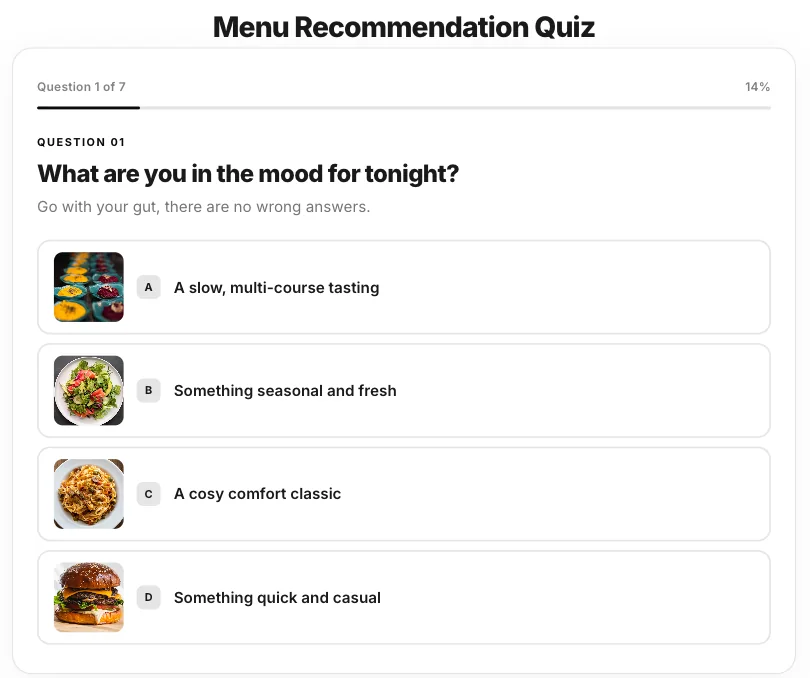
The difference from a form is in the editor. Every answer has a points value, shown on the right of each answer.

Each outcome then covers a range of the total score and has its own title, text and button. In the template below, a visitor who scores 21 to 28 sees “The Chef’s Tasting Experience” with a button to reserve a table. A lead gate step sits before the outcomes. That is where the visitor’s contact details are collected.

You can start from one of the 16 templates, each with seven questions, a lead form and three outcomes. Plans and the trial terms are on the pricing page.
Option 3: Buy a quiz plugin once
If you do not want a subscription, a plugin is the other route: you pay once and the quiz runs from code pasted into your site. Squarespell, which also makes Squarespell Quiz, sells one, the Interactive Quiz Plugin for Squarespace 7.1.

Its listing, read on October 5, 2026, says it collects an email before the quiz, supports multiple results with custom messages, delivers results by email, and installs with one code snippet in Squarespace’s Code Injection. It is sold as a one-time purchase with no monthly fee, and the current price is on the listing. The listing says it works on Squarespace 7.1 Business and Commerce plans. Squarespace’s current plan names are different (see the plan note below), so check that your plan includes Code Injection.
The two products suit different people. The plugin fits a site owner who wants a quiz on their own site and no recurring bill. A hosted tool fits someone who wants templates, an editor, a lead dashboard and analytics in one account.
How an outside quiz gets onto a Squarespace page
Both outside options add a line of code to your site once, through Squarespace’s Code Injection. The plugin’s listing says installation is one code snippet in Code Injection. Squarespell Quiz uses one loader line in the same place, then handles each quiz from the app.
Check your plan before you pick a tool. On October 5, 2026, Squarespace’s code injection guide read: “Code injection is available in the Core, Plus, Advanced, and some legacy billing plans.” Plan names change, so read the guide again on the day you install.
In Squarespell Quiz, the steps are in the app under Publish, then Sites:
- Connect the website once. Choose Squarespace, enter your site’s address, paste the loader line from the app into Code Injection, in the Footer, and let the app verify it. You do not repeat this for each quiz.
- Publish to website. Pick a Floating tab (no new code needed), a Popup (after a delay, a scroll depth or exit intent) or Inline (inside a page; each new location needs one slot line in a Code Block).
- Choose the pages. All pages, selected pages, or all pages except some, with a desktop and mobile preview. You can change this later from the app.


Copy the loader line from the app, not from a picture or a guide, because it carries your own site key. Two more things to know:
- Test in a private window. Check the live page while logged out of Squarespace, the way a visitor sees it.
- A link works on any plan. Every live Squarespell quiz also has its own link. If your plan does not include Code Injection, a normal Squarespace button can open the quiz.
Which option fits which job
- You want to collect answers and reply yourself. Use the form block. A quiz would add cost without adding anything.
- You teach a course and want students to check themselves. Use accordion blocks in the lesson.
- You sell one thing. Skip the quiz. Every result would say the same thing, and a clear page with a button does more.
- You have several services or products and visitors ask which one is right. This is the job a scored quiz does well. Use a hosted tool if you want leads, results and analytics in one place.
- You want a quiz on one site and no monthly bill. Look at the one-time plugin.
- You need exams, grades or certificates. None of these options is built for that. Look for a testing or course tool.
What to do next
If the form block covers your case, build it today: a radio field per question and one follow-up where it helps. If you need a result for each visitor, read how it works with Squarespace on the Squarespace quiz page, pick a starting point from the templates, and start a trial when you are ready. Plans are on the pricing page.
How this guide was checked
Every statement about Squarespace is quoted from its help center, read on October 4, 2026 and checked again on October 5, 2026, and the help pages shown were captured on October 4. The Squarespell Quiz screens are real screens of the app captured on October 4, 2026, and the two publishing screens were captured on October 5, 2026, while a template quiz was published to a blank page of a Squarespace test site. We did not build a Squarespace form, publish a quiz to a Squarespace site or install the one-time plugin for this article. The plugin’s features are taken from its listing, read again on October 5, 2026.