Not automatically. Squarespell Quiz has no direct connection to Squarespace Email Campaigns today, and a quiz is not one of the Squarespace forms that can feed a mailing list. Your quiz leads can still end up in Squarespace: export them as a CSV and import that file into a mailing list. If you want each new lead to get the right email on its own, let the quiz tool or a connected email tool do the follow-up instead.

The short answer
Squarespace Email Campaigns sends to mailing lists, and a mailing list only grows in the ways Squarespace offers. A quiz built in another tool is not one of them, so there is no setting that pipes quiz leads straight into a list. That leaves three working routes, plus one for developers:
- Export and import. Download your quiz leads as a CSV and upload them to a Squarespace mailing list. Free and simple, but manual.
- Split the jobs. The quiz tool sends the result email and any follow-up by outcome. Squarespace keeps sending your newsletter, and you import quiz leads now and then.
- One connected email tool. Send quiz leads to Mailchimp, Klaviyo or Kit automatically and run your newsletter from there too.
- A developer route. A webhook from the quiz plus Squarespace’s Contacts API. Possible on paper, not a weekend project.
Which one fits depends on how many leads you get and how much your follow-up should depend on the quiz result. The table near the end compares them.
How Squarespace mailing lists take in contacts
Squarespace’s help page Build mailing lists (read October 27, 2026) and its page on form and newsletter storage list the ways in:
- Sign up forms on your site. Newsletter blocks, the newsletter signup at checkout and promotional pop-ups can save straight to a mailing list.
- Form blocks with Email Signup. When a form block has a required email field and Email Signup is on, people who tick the box appear under Subscribers.
- One at a time. In Lists & Segments you can add a subscriber by hand.
- A CSV upload. You can import a file of contacts you exported from somewhere else.
You can have up to 20 mailing lists, and you can build them before you pay for Email Campaigns. To send, Squarespace’s getting started guide says you need an Email Campaigns subscription, at least one mailing list and verified sender details. For quiz leads, the CSV upload is the door that stays open.
Route 1: export quiz leads and import the CSV
This is the route most Squarespace owners want, and it works on every Squarespell Quiz plan: the features page says every plan includes the lead dashboard and CSV export.
Step 1: export your leads
- In Squarespell Quiz, open Audience, then Leads.
- Pick the quiz in the quiz filter if you only want one quiz’s leads, and set the time filter to the period since your last import.
- Click Export CSV and save the file.
Step 2: shape the file for Squarespace
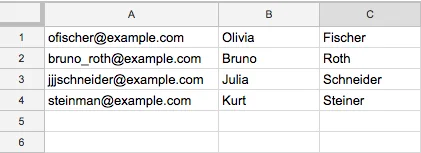
Squarespace reads only the first three columns of an import file, in this order: email address, first name, last name. The names are optional and anything after the third column is ignored. Its help page also says the file must hold 500,000 contacts or fewer and should have a plain file name with no special or accented characters.
Open the export in a spreadsheet, move the email column to column A and the name to column B, and delete or move everything else past column C. If your lead form asks for one name field, leave column C empty. Save it as a CSV with a name like quiz-leads-october.csv.
Step 3: import it into a mailing list
- In Squarespace, open the Lists & Segments panel and click the mailing list (or click Create Mailing List first).
- Click Add Subscribers, then Upload a list.
- Click Add a CSV file and choose your file.
- Switch on These subscribers accept marketing only if every person in the file agreed to hear from you.
- Preview the list, then click Import.
Squarespace skips duplicates, so importing a file that overlaps your last one is safe. It also will not resubscribe someone who unsubscribed from that list, even if their address is in your new file.
Step 4: keep the quiz result useful
The import keeps only email and names, so the quiz outcome is lost on the way. Two ways to hold on to it:
- One list per outcome. Split the export by outcome in your spreadsheet (if your file shows each lead’s result) and import each part into its own list, such as “Quiz: Full-day package”. With three outcomes you use three of your 20 lists.
- One list per quiz. If you run several quizzes, filter the Leads page by quiz before each export, so each list matches one quiz.
Squarespace can send an automated email when someone subscribes to a mailing list. The help pages read for this guide do not say whether a CSV import starts that automation, so add your own address in a test file before you count on a welcome email going out.
Route 2: let the quiz send the follow-up
The email that matters most after a quiz is the one that arrives in the first minutes and talks about that person’s result. A monthly CSV import cannot do that. Squarespell Quiz can: the pricing page lists a result email to every lead on every plan, and the features page says that on Pro each outcome can start its own email sequence.

In this setup the two tools do different jobs:
- Squarespell Quiz sends the result email and the short sequence for each outcome, which our guide to follow-up emails after a quiz walks through.
- Squarespace Email Campaigns keeps sending your regular newsletter. Every week or month, you import new quiz leads who agreed to it with Route 1.
The catch is that these are two separate lists. Someone who unsubscribes from your Squarespace newsletter is still a lead in the quiz tool, and the other way round, so keep the sequences short and remove people by hand when they ask.
Route 3: one connected email tool for everything
If you want quiz leads to land in a mailing list the moment they finish, the list has to live in a tool the quiz can reach. The integrations page (read October 27, 2026) lists Mailchimp, Klaviyo, Kit (ConvertKit), Google Sheets and webhooks as live, and none of them is Squarespace Email Campaigns.
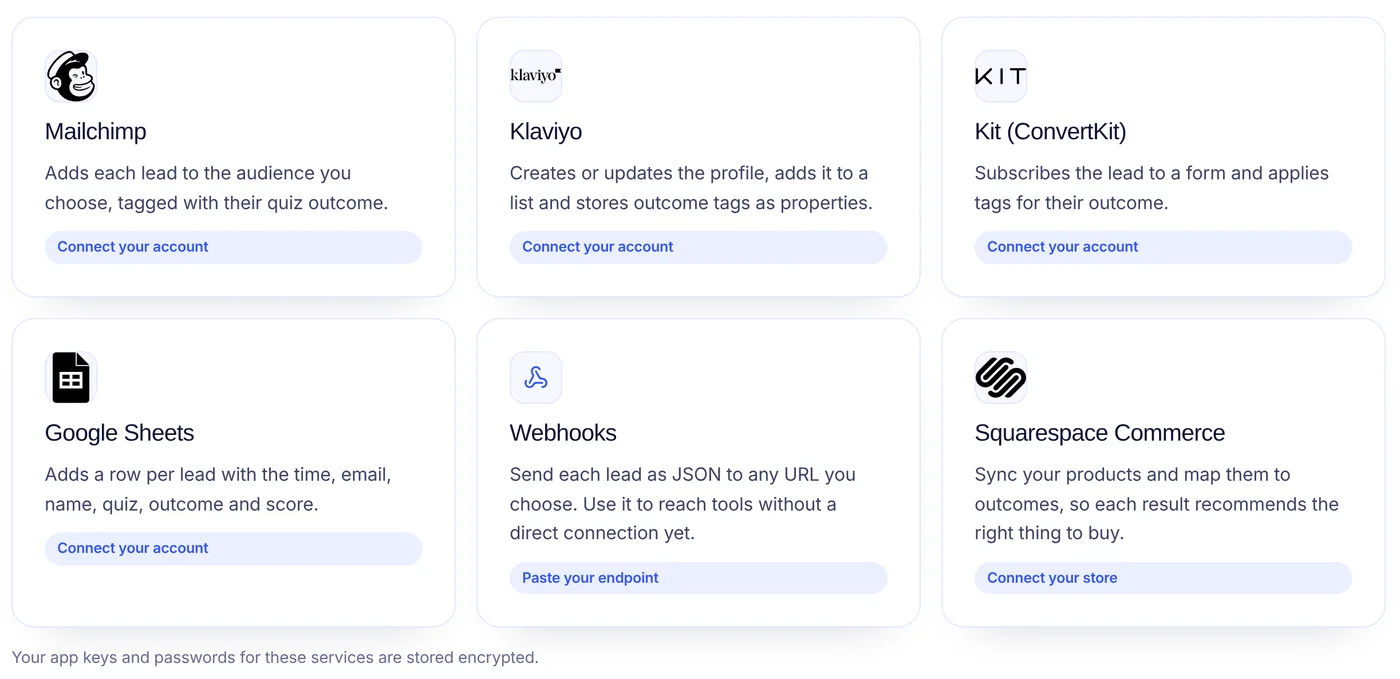
Mailchimp, for example, adds each lead to the audience you choose, tagged with their quiz outcome. That gives you what Route 1 cannot: the list grows on its own and the outcome comes along as a tag you can send to. Integrations and webhooks are on the Pro and Business plans.
Moving your newsletter to the same tool is the honest cost of this route. Squarespace forms can send sign ups to Mailchimp too, but its storage page says that integration needs a Core, Plus or Advanced plan or some legacy plans. If your whole list already sits in Squarespace and you send one newsletter a month, a move like that is a lot of work for a small gain, and Route 1 or 2 is enough.
What about Zapier or a developer?
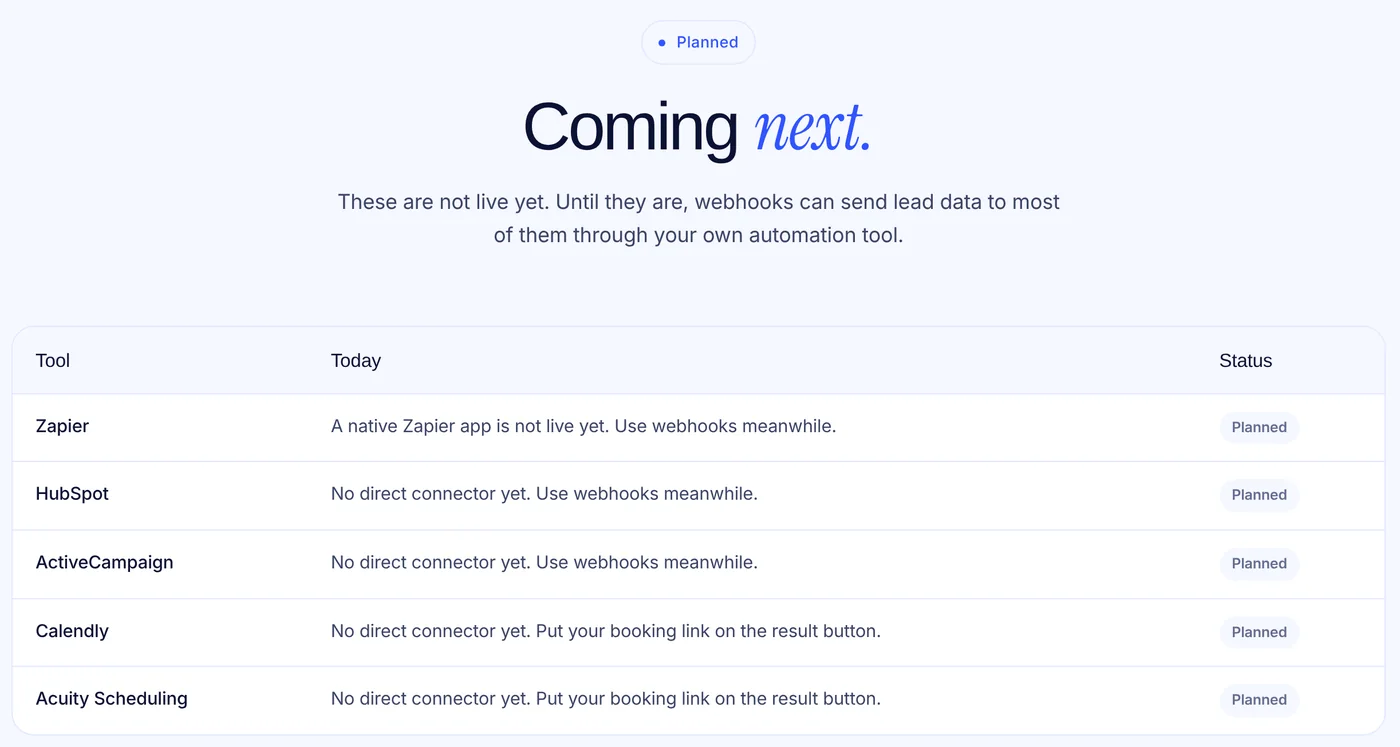
Zapier is often the first idea, and today it does not help here. Squarespell Quiz has no Zapier app yet: the integrations page marks Zapier as Planned and says to use webhooks meanwhile. On the Squarespace side, the help page on form integrations with Zapier describes Zapier as a way to send Squarespace form submissions out to other apps, not as a way to add contacts into a Squarespace mailing list.
A developer has one more option. Squarespace’s Contacts API overview (read October 27, 2026) describes create, read, update and delete access to contacts and their marketing preferences, and it lets a new contact be marked as accepting marketing. A webhook from the quiz sends each lead as JSON, with the email, name, quiz, outcome and score, so a small service could take that and create the contact. Two limits to know before anyone starts: the overview does not describe choosing a specific mailing list, and nobody tested this route for this guide. Treat it as a project for a developer, with a test site first.
Which route fits you
| Route | Best for | What you keep | What you give up |
|---|---|---|---|
| Export and import | A few leads a week, newsletter in Squarespace | One newsletter tool, any quiz plan | Speed and the outcome, unless you split lists |
| Quiz sends the follow-up | Results that need their own email | Instant result emails, Squarespace for news | A single list: you manage two |
| Connected email tool | Steady lead flow, outcome based campaigns | Automatic lists with outcome tags | Squarespace Email Campaigns as your sender |
| Webhook and Contacts API | Sites with a developer | Automatic contacts in Squarespace | Time, testing and a named list |
For most small businesses on Squarespace, the mix of Routes 1 and 2 is the sweet spot: the quiz handles the result and the first follow-up, and the people who said yes to your newsletter move into Squarespace once a month.
Next step
If you have not built the quiz yet, start with one of the quiz templates and set up the result email first, since that is the message your leads will read soonest. Ideas for other ways to collect emails on a Squarespace site are in Squarespace lead capture ideas. When you are ready, create your account and compare what each plan includes on the pricing page.