The quizzes that work for restaurants are short and playful, and they end with a reason to book: what to order tonight, which occasion fits, which private dining package, which drink or coffee. Each one asks for an email address just before the answer, so every curious diner can join your list. Below are six ideas with the questions, the results and the offer for each, and the template that already does the first one.
Why a quiz suits a restaurant website
People visit a restaurant website to look at the menu, the opening hours and the address. Then they close the tab. A newsletter box that says “Join our list” gives them no reason to stay, because they do not know yet what they would get.
A quiz gives them something they want right now: a recommendation. It feels like a server suggesting a dish. In return for the answer, you ask for an email address and a first name, and you get something a plain signup form never tells you: what this person likes, who they dine with and when they plan to come.
That matters most for guests who book through a third-party app. Our restaurants page puts it this way: diners who book through those apps “may never land on your own email list, so you have no way to invite them back.” A quiz on your own site is one way to start that list yourself.
Every idea below follows the same shape:
- Five to seven quick questions. Taste, occasion, group size, dietary needs, timing. Picture answers work well for food.
- A lead form before the result. Name the result and add a small offer for a first visit.
- Two to four results. Each one recommends something real on your menu and has one button: reserve, order, or send an inquiry.
1. What should you order tonight?
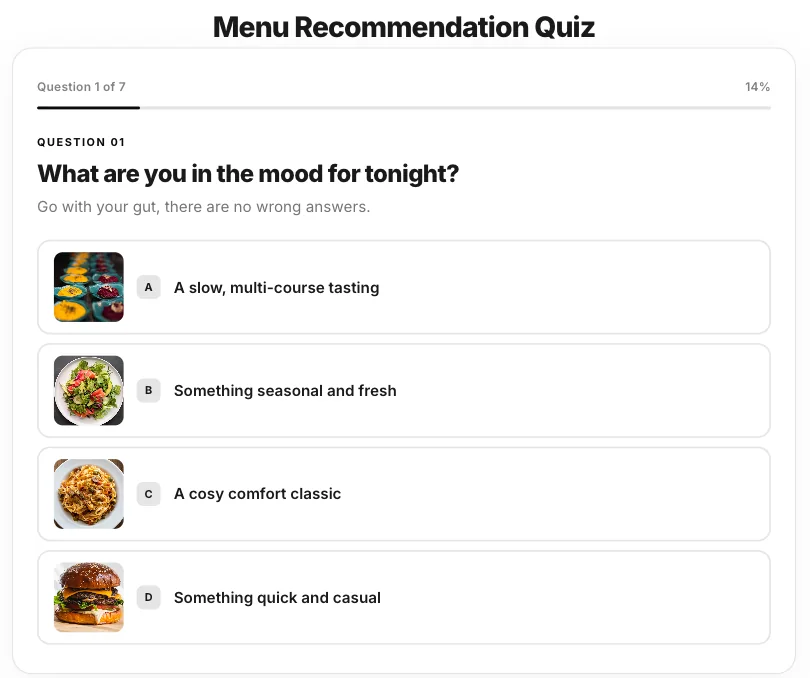
This is the menu match, and it is the easiest place to start because a ready template exists. The Menu Recommendation Quiz has 7 questions, a lead form and 3 scored outcomes, and its template page says it takes about 2 minutes. We read it on October 15, 2026.
The questions. What kind of meal are you in the mood for, the flavors you love most, who you are dining with, any dietary preferences, what you would like to drink, how you want the evening to feel, and when you plan to visit.
The results. Every answer carries 1 to 4 points, so the total runs from 7 to 28. A total of 21 to 28 shows The Chef’s Tasting Experience, 14 to 20 shows The Seasonal Signature, and 7 to 13 shows The Classic Comfort Plate. Each result has its own button: Reserve a table, See the seasonal menu, and Order or reserve.

The offer. The template’s lead form says “Your perfect menu is ready” and asks for an email “to see your recommended dishes and a welcome offer for your first visit.” Replace that offer with one you will honor: a free dessert, a glass of house wine, or a bread basket for the table.
Rename the three results after your own dishes or menus. If you have no tasting menu, make the top result your chef’s specials or a sharing menu for the table.
2. Date night, family dinner or a group booking?
An occasion planner helps people pick the right time and table, which matters if your room feels very different on a Tuesday than on a Saturday.
The questions. Who is coming, how many people, the occasion (a date, a birthday, a work dinner, a casual night), the mood they want (quiet or lively), and which day they are thinking of.
The results. Three is enough. Date night recommends the quieter early seating and two dishes to share. Family table points to the kids menu or the larger sharing plates. Group celebration explains how group bookings work at your place and asks them to book ahead.
The offer. Something for the occasion: a candle on the dessert for a birthday, or a welcome drink for groups of six or more. Each result button goes to your reservation page.
The template’s third question, “Who are you dining with?”, already covers part of this. You can copy the Menu Recommendation Quiz and rewrite it around the occasion instead of the food.
3. Private dining and catering finder
Event inquiries are the most valuable leads a restaurant gets, and the slowest to handle. Most inquiry forms collect a name and a date, and then the back and forth starts. A short quiz can collect what you need to reply with a real proposal.
The questions. The type of event, the number of guests, where it takes place (your private room or their venue), the date or month, the style of service (seated, buffet, canapés) and the budget per person, in ranges that match your own packages.
The results. One result per package, for example a private room dinner, a full buyout and an off-site catering package. Each result names what is included and has a button to your events inquiry page or a call booking link.
The offer. A menu tasting for bookings over a set size, or simply a promised reply within one working day.
A quiz like this recommends a package. It does not calculate a price. If every event is quoted from scratch, keep a plain inquiry form. Our guide to the which package is right for you quiz shows how to set the points so the total lands on the right package.
4. Find your wine, cocktail or coffee match
A drink match promotes the bar menu, and it works just as well for a cafe or a coffee roaster.
The questions. The flavors they like (fruity, dry, bitter, sweet), how adventurous they feel, what they will eat with it, and the time of day. For a cafe: how they take their coffee, how strong they like it, and whether they want something cold.
The results. Three or four drinks from your real list, each with one line on why it fits and a button to the drinks menu or to book a table.
The offer. A tasting flight at the bar, or a second coffee on the house for a cafe.
Always give an alcohol free answer and an alcohol free result. The template’s drink question does this with “Something alcohol free”. Before you run any drinks offer, check your local rules on promoting alcohol.
5. What can I eat here? A dietary needs guide
People with dietary needs often check a menu before they choose a restaurant. A short quiz can point them to the dishes that suit them and show that you thought about it.
The questions. Their diet (vegetarian, vegan, gluten free, dairy free, no restrictions), how hungry they are, and whether they want to share.
The results. A short list of dishes for each diet, with the menu page as the button.
A limit to respect. A quiz result is a menu suggestion, not allergy advice. Say on every result that guests with an allergy should tell the staff when they order, and never write “safe for” on a quiz result.
6. Which cake or catering box for your celebration?
For bakeries and cafes that take custom orders, a quiz can turn “how much is a cake?” messages into complete orders.
The questions. The occasion, how many people it should serve, the flavors they love, any dietary needs and the date they need it.
The results. Your three or four most ordered options, each with how much notice you need and a button to your order form.
The offer. Free writing on the cake, or a small box of cookies with the first order.
Put the notice period in the date question’s help text, so someone who needs a cake tomorrow knows before they leave their email.
Making it work: form, button, follow-up and placement
The idea matters less than four details: what you ask for, where the result sends people, what happens after, and where the quiz sits.
The lead form
In the editor, the lead form is the Lead gate step under the questions. It has a headline, a line of text, the fields and a button label. In the template, email is required and first name is optional.

Keep it to email and first name. A phone number is worth asking for only on the private dining quiz, where you will call.
One button on every result
Each outcome in the editor has its own button text and link, next to its score range. In the template, The Chef’s Tasting Experience covers 21 to 28 points and its Reserve a table button links to a reservations page.

Send the button to the page where people act: your reservation page, your online ordering page, or your events inquiry page. Squarespell Quiz does not connect to reservation systems. Our restaurants page answers that question with “Not directly. Link the result button to your reservation page.” We read it on October 15, 2026. For the wording of each result, see how to write quiz result pages that turn into bookings.
Tags and the follow-up email
The answers are the point of the whole exercise. A list where you know who likes the tasting menu and who books for groups lets you send the right email to the right people: the new tasting menu to one group, the holiday party dates to the other.
In the app, tags live under Audience, then Segmentation, where you can create tags and group leads by interest, intent or source. The pricing page lists tags and a result email to every lead on every plan (read October 15, 2026). For what to send after the quiz, our follow-up email templates give five you can adapt.

Where to put it on your website
- The menu page. Above the menu, with a line such as “Not sure what to order? Take the two minute quiz.”
- The private dining or events page. The catering finder belongs here, next to the inquiry form, not instead of it.
- Your social profiles and table cards. Every live quiz has its own share link. Put it in your bio, or print it as a QR code on a table card for the next visit.
To get the quiz onto a Squarespace site, open Publish, then Sites in the app. You connect the website once by pasting one loader line into Squarespace Code Injection. After that you choose Publish to website, pick a placement (Floating tab, Popup or Inline) and choose the pages, for example only your menu page. Floating tab and Popup need no more code. Inline needs one slot line in a Code Block on the page where the quiz should sit.
One limit to know: Squarespace says “Code injection is available in the Core, Plus, Advanced, and some legacy billing plans” (Squarespace help center, read October 15, 2026). Our quiz lead magnet guide shows the publishing flow with real screens, and where to place a quiz on your website compares the placements.
When a quiz is not worth it for your restaurant
- You will never email the list. A quiz builds a list. If nobody will write to it, a clear menu and a booking button do more.
- Your menu changes every day. Results that name dishes go out of date fast. Recommend menus or styles of dish instead, or run a seasonal quiz and take it down when the season ends.
- You are full every night. If you have a waiting list, you need a way to manage bookings, not more of them. A private dining quiz may still pay off.
Start with the Menu Recommendation Quiz
Pick one idea, not six. For most restaurants the menu match is the right first quiz, because the Menu Recommendation Quiz already has the questions, the points and three results with buttons. Change the dishes, the offer and the button links to your own, then take the quiz yourself and check every result before you share it.
The restaurants page shows how the pieces fit together, and quiz lead magnet ideas for 12 kinds of small business has ideas for other businesses. When you are ready, create an account. The pricing page has the current plans and trial terms.
How this guide was checked. The template’s questions, points, score ranges, lead form text and results were read on its public template page on October 15, 2026, when its outcome cards were captured. The editor screens come from the live Squarespell Quiz app, captured on October 3 and 4, 2026, and the changelog lists no change since its October 2, 2026 entry. The publishing steps follow the flow as it was in the app on October 5, 2026.
Ideas 2 to 6 are suggested outlines. They were written on paper and not built in the app. We did not open the app on the day of writing, test tags being added automatically or send a result email.